> ## Documentation Index
> Fetch the complete documentation index at: https://docs.leen.dev/llms.txt
> Use this file to discover all available pages before exploring further.
# SonarQube (SonarCloud)
> Instructions on how to configure API access for SonarQube / SonarCloud to fetch code quality and security findings.
## Supported Data Models
* [Issues (AppSec)](/integrations/application-security)
* type: `code`
* [Vulnerability Findings V2](/integrations/v2/vulnerability-findings-v2)
* type: `code`
* Resources
* type: `branch`
## Onboarding SonarQube / SonarCloud
Follow the steps below to onboard your environment to our SonarQube / SonarCloud integration.
1. Log in to your SonarCloud account at [sonarcloud.io](https://sonarcloud.io) (or your self-hosted SonarQube instance).
2. Navigate to **My Account** by clicking on your profile avatar in the top-right corner.
3. Go to the **Security** tab.
4. Under **Generate Tokens**, enter a name for your token (e.g., "Leen Integration") and click **Generate**.
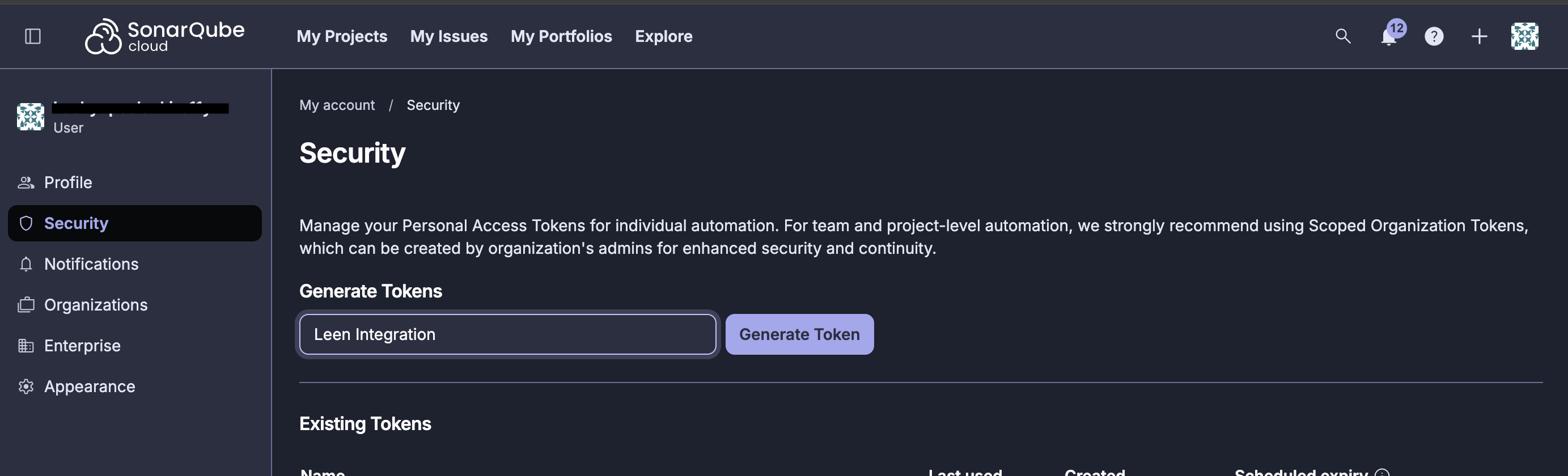 Record your API token somewhere safe. After the token generation window is closed, the token value is no longer visible.
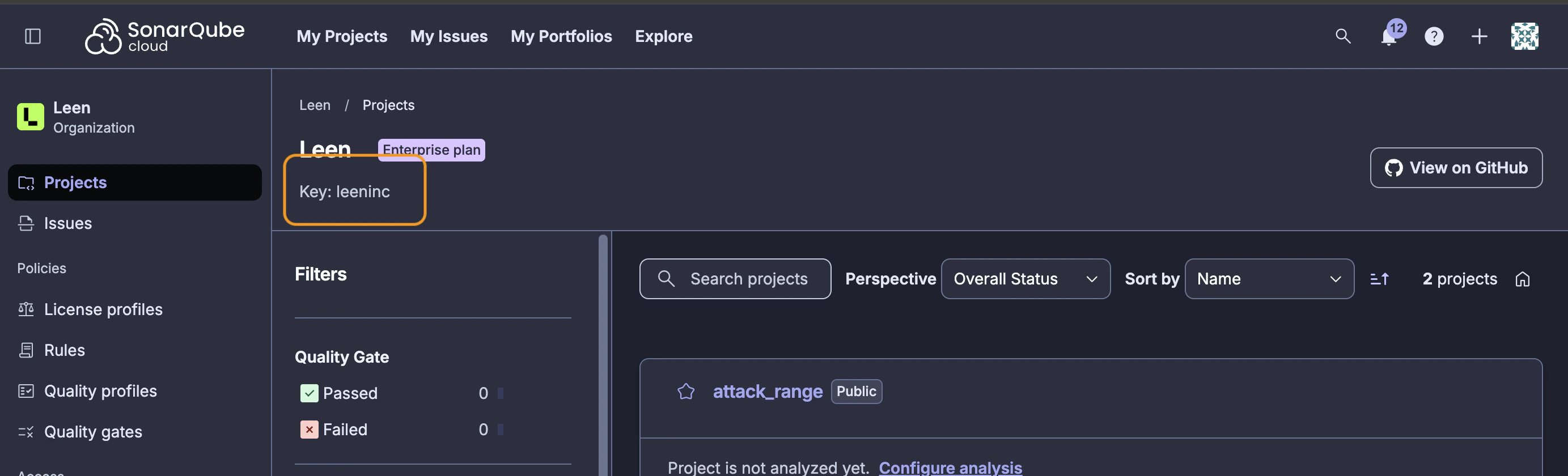
1. Navigate to your organization's page in SonarCloud.
2. The organization key can be found in the URL: `https://sonarcloud.io/organizations/{organization-key}/projects`
3. Alternatively, go to **Organization Settings** and copy the **Organization Key**.
Record your API token somewhere safe. After the token generation window is closed, the token value is no longer visible.
1. Navigate to your organization's page in SonarCloud.
2. The organization key can be found in the URL: `https://sonarcloud.io/organizations/{organization-key}/projects`
3. Alternatively, go to **Organization Settings** and copy the **Organization Key**.
 In your Leen integration configuration, provide the following:
| Parameter | Description | Required |
| ---------------- | -------------------------------------------------------------------------------------------------------- | -------- |
| **Base URL** | The base URL for your SonarQube/SonarCloud instance. Defaults to `https://sonarcloud.io` for SonarCloud. | No |
| **Organization** | Your SonarCloud/SonarQube organization key. | Yes |
| **API Token** | The user token generated in Step 1. | Yes |
For self-hosted SonarQube instances, update the **Base URL** to point to your instance (e.g., `https://sonarqube.yourcompany.com`).
## Required Permissions
The user token must have access to the following:
* **Browse** permission on all projects you want to sync
* **Execute Analysis** permission (optional, but recommended for complete data access)
For organization-level access, ensure the token belongs to a user who is a member of the organization with appropriate permissions to view all relevant projects.
## Severity Mapping
SonarQube severities are mapped to Leen's unified severity model as follows:
| SonarQube Severity | Leen Severity |
| ------------------ | ------------- |
| BLOCKER | Critical |
| CRITICAL | High |
| MAJOR | Medium |
| MINOR | Low |
| INFO | Info |
## State Mapping
SonarQube issue states are mapped to Leen's unified state model as follows:
| SonarQube Status/Resolution | Leen State |
| --------------------------- | ---------- |
| OPEN, CONFIRMED | Open |
| REOPENED | Reopened |
| RESOLVED, CLOSED | Closed |
| FALSE-POSITIVE, WONTFIX | Ignored |
| REMOVED | Closed |
## Data Synced
The SonarQube integration syncs the following data:
* **Issues**: Code quality and security issues detected by SonarQube analysis
* **Security Hotspots**: Security-sensitive code that requires review
* **Projects/Components**: Repository and project information
For any additional information about our field mappings or integrations, please contact us.
In your Leen integration configuration, provide the following:
| Parameter | Description | Required |
| ---------------- | -------------------------------------------------------------------------------------------------------- | -------- |
| **Base URL** | The base URL for your SonarQube/SonarCloud instance. Defaults to `https://sonarcloud.io` for SonarCloud. | No |
| **Organization** | Your SonarCloud/SonarQube organization key. | Yes |
| **API Token** | The user token generated in Step 1. | Yes |
For self-hosted SonarQube instances, update the **Base URL** to point to your instance (e.g., `https://sonarqube.yourcompany.com`).
## Required Permissions
The user token must have access to the following:
* **Browse** permission on all projects you want to sync
* **Execute Analysis** permission (optional, but recommended for complete data access)
For organization-level access, ensure the token belongs to a user who is a member of the organization with appropriate permissions to view all relevant projects.
## Severity Mapping
SonarQube severities are mapped to Leen's unified severity model as follows:
| SonarQube Severity | Leen Severity |
| ------------------ | ------------- |
| BLOCKER | Critical |
| CRITICAL | High |
| MAJOR | Medium |
| MINOR | Low |
| INFO | Info |
## State Mapping
SonarQube issue states are mapped to Leen's unified state model as follows:
| SonarQube Status/Resolution | Leen State |
| --------------------------- | ---------- |
| OPEN, CONFIRMED | Open |
| REOPENED | Reopened |
| RESOLVED, CLOSED | Closed |
| FALSE-POSITIVE, WONTFIX | Ignored |
| REMOVED | Closed |
## Data Synced
The SonarQube integration syncs the following data:
* **Issues**: Code quality and security issues detected by SonarQube analysis
* **Security Hotspots**: Security-sensitive code that requires review
* **Projects/Components**: Repository and project information
For any additional information about our field mappings or integrations, please contact us.