

Overview
External webhooks let Leen call you. Register an HTTPS endpoint, subscribe it to the events you care about, and Leen POSTs a JSON envelope to that endpoint whenever one of them happens. The usual reason to use them is to stop polling. Instead of asking “has this connection synced yet?” on a timer, you receiveconnection.sync.succeeded and pull the new data once, when there
actually is new data.
This page is about external webhooks - Leen calling your service. That is a different feature
from Third-Party Webhooks, where a vendor such as JIRA calls Leen
to push data in. The two do not interact.
Events
The Add endpoint dialog in the portal lists every event with its description, and is always
current - check there rather than relying on the table above.
Registering an endpoint
Webhook endpoints are managed from the Leen portal, under Settings → Webhooks.1
Open Settings > Webhooks
Each row is one endpoint: where it points, which events it receives, and whether it is
currently enabled.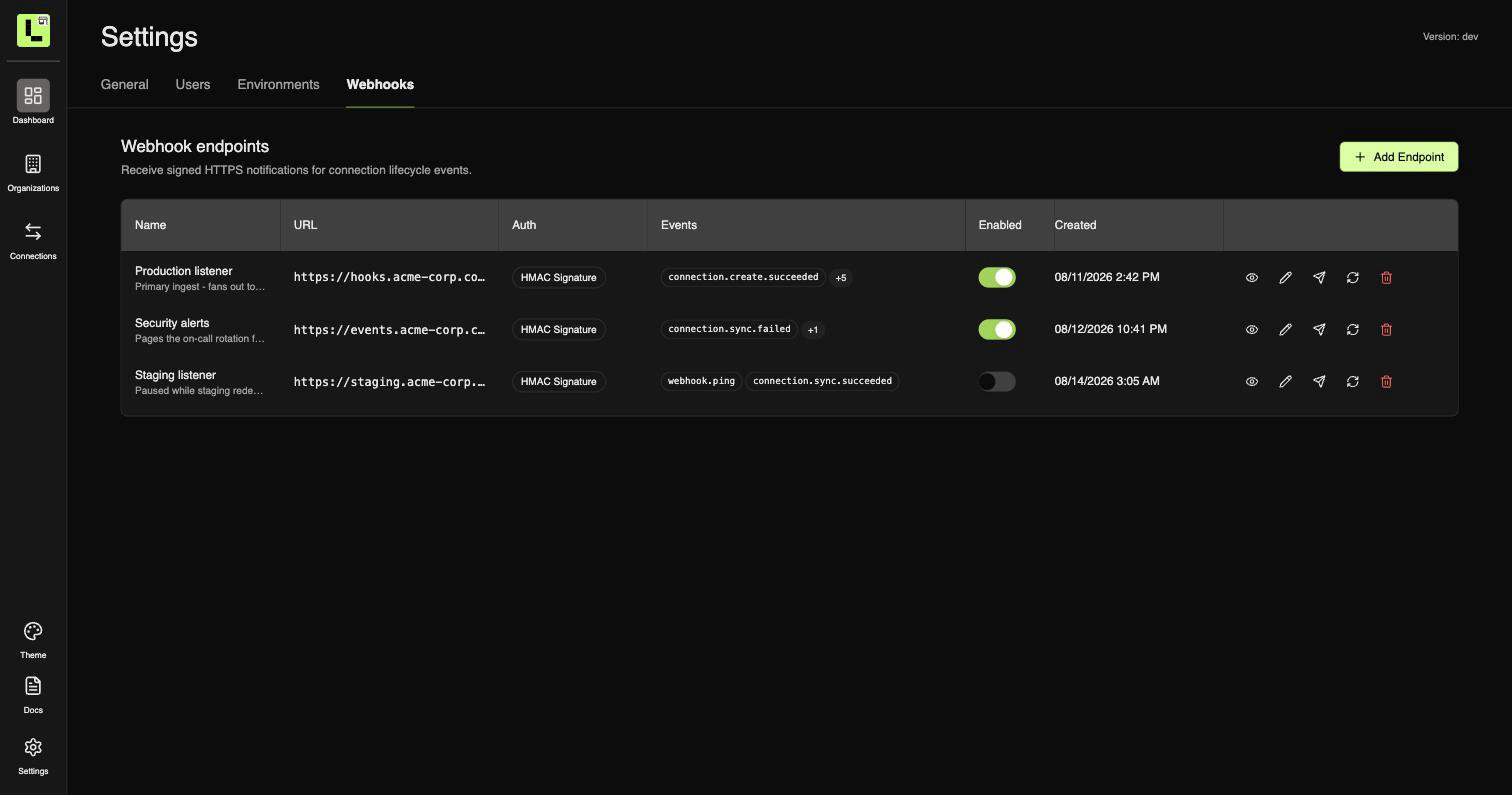
2
Add an endpoint
Click Add Endpoint, then give it a name and an HTTPS URL and tick the events you want.
Every subscribable event is listed with a description of exactly when it fires.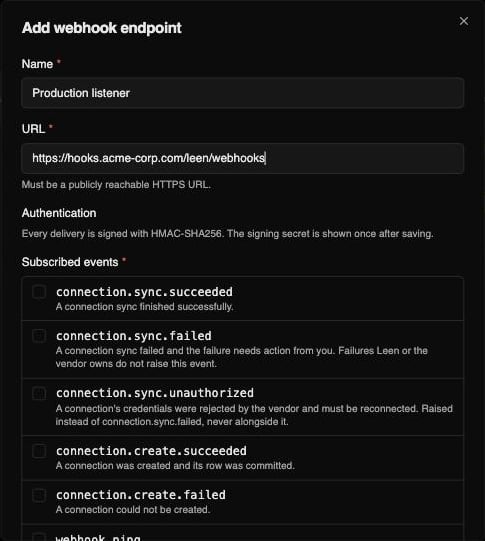
3
Store the signing secret
Leen generates a signing secret and shows it exactly once, on save.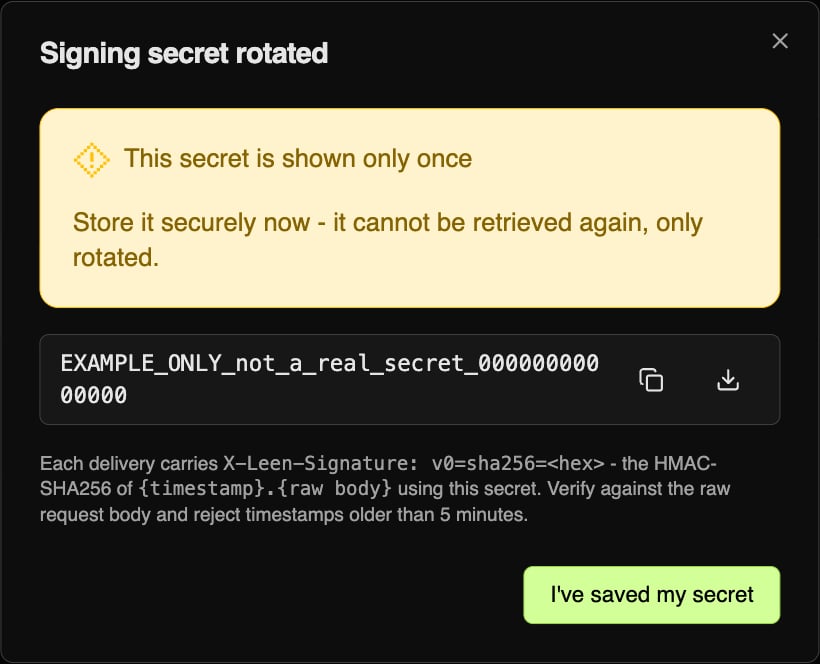
4
Send a test event and check the result
Send test queues a 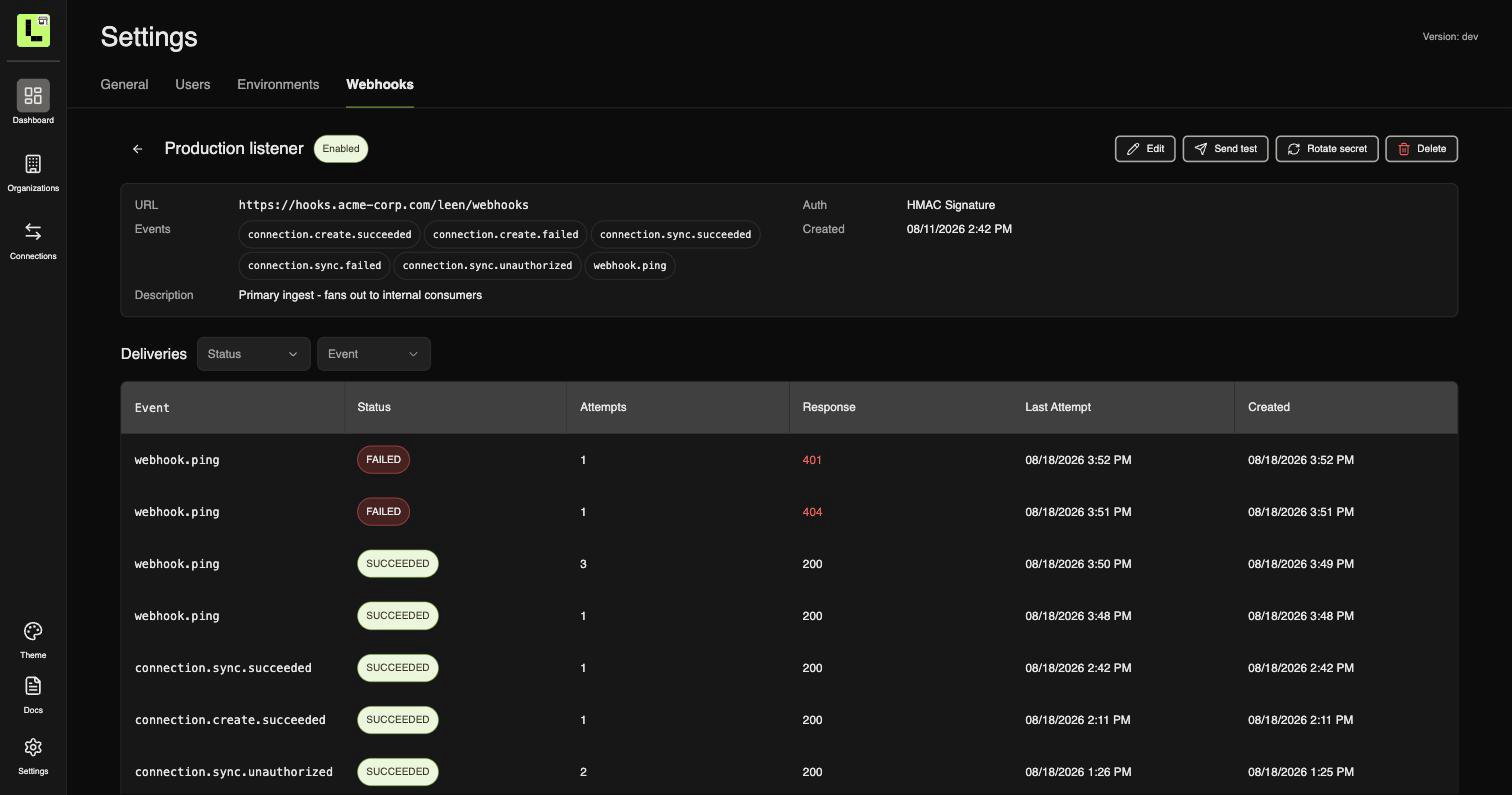
webhook.ping to that endpoint alone - the other endpoints
subscribed to webhook.ping do not receive it. The endpoint must be enabled and
subscribed to webhook.ping, or nothing is sent.Delivery is asynchronous, so open the endpoint to watch the outcome. The Deliveries table
records every attempt with its status, attempt count, and the HTTP code your endpoint
returned - a failed signature check shows up here as a 401 without you adding any logging.401 and 404 rows above are
permanent rejections - neither is retried, so both stop at a single attempt. The row with 3
attempts is a 500 that was retried and then accepted.URL requirements
- HTTPS only. Plain HTTP is rejected.
- Publicly resolvable. URLs that resolve to a private, loopback, link-local, reserved, multicast, or unspecified address are rejected. This is an SSRF guard.
- Re-checked before every delivery, not just at registration - a hostname that resolves publicly today but is later re-pointed at an internal address stops receiving deliveries.
- 2048 characters maximum.
What Leen sends
A single JSON object, POSTed asapplication/json:
id, type, created_at, and environment_id are on every event. connection_id is on every
connection.* event - it is at the root, not inside data, so you can route on it without
knowing the event’s payload shape. It is null in exactly one case: a connection.create.failed
raised before the connection existed at all.
data is where the event-specific fields live. Every connection.* event carries the same three:
Keys are serialized in alphabetical order, and the payload may grow new keys - so parse it as
JSON, and ignore fields you do not recognize rather than rejecting them.
Error codes
error is a fixed set. The text in description may be reworded at any time; these codes will
not be.
Headers
Delivery, retries, and duplicates
A delivery counts as successful on any 2xx. Return one as soon as you have durably accepted the event - do your real work afterwards, not before, or slow processing will read as a failure.- Timeout: 15 seconds per attempt.
- Retried: 5xx, plus
408and429. - Not retried: any other 4xx. A
400or401is treated as a permanent rejection and the delivery is marked failed immediately. - 5 attempts with exponential backoff - roughly 10s, 30s, 90s, then 4.5m after the first, so the last attempt lands about 7 minutes in.
Authentication
Every delivery is signed with HMAC-SHA256. There is no unauthenticated mode and nothing to choose at registration - Leen signs each request with a secret only the two of you know, so you can prove the request really came from Leen and that nobody altered it in transit. The signature is hex HMAC-SHA256 over{timestamp}.{body}, sent as:
=, confirm the version and algorithm are v0 and sha256,
recompute the digest over the raw request body, and compare in constant time. Then bound the
age of X-Leen-Timestamp - 5 minutes is the recommended tolerance - which is what stops someone
replaying a request they captured earlier.
Working code for this is on the Receiver Example page.
Rotating the signing secret
Rotate secret on the endpoint’s detail page issues a new secret and shows it once, under the same rule as the original. Deliveries already in flight are signed with whichever secret is current at the moment the attempt is made, so a rotation can land between the original attempt and its retry. To rotate without dropping events, accept either secret for a few minutes, then drop the old one.Managing endpoints
Each row on Settings → Webhooks carries the actions for that endpoint:
Turning an endpoint off stops deliveries without losing its configuration or its secret, which
is what you want during your own deploys - preferable to deleting and re-adding, since re-adding
issues a new secret.
Troubleshooting
Signature mismatch on every request
Signature mismatch on every request
Almost always re-serialized JSON. Verify against the raw request body, before any parsing.
Confirm you are using the secret from this endpoint, and that it has not been rotated since.
The test event never arrives
The test event never arrives
Send test silently sends nothing unless the endpoint is enabled and subscribed to
webhook.ping. Confirm both, then check the Deliveries table - a failed attempt records
your status code and response body.Deliveries stopped without any change on your side
Deliveries stopped without any change on your side
The URL is re-validated before every attempt. If DNS for the host now resolves to a private or
non-routable address, deliveries are refused by design. Also check the endpoint has not been
disabled.
You are getting the same event twice
You are getting the same event twice
Expected. Deduplicate on
X-Leen-Event-Id, which is stable across retries and across
endpoints.Connections go quiet instead of reporting a failure
Connections go quiet instead of reporting a failure
Two by-design cases: failures Leen or the vendor owns raise nothing at all, and expired
credentials raise
connection.sync.unauthorized rather than connection.sync.failed.
Subscribe to the unauthorized event.